App-Like Navigation Drawer Using Pure CSS
Introduction
Open almost any popular mobile app today, and you'll notice one thing they all have in common: smooth, easy-to-use navigation. Whether it's a banking app, food delivery service, social platform, or shopping application, users expect menus to feel natural and effortless. That's why learning how to create an app like navigation drawer CSS experience has become an essential skill for modern frontend developers.
The good news is that you don't always need JavaScript libraries or complicated frameworks to build professional navigation systems. With carefully structured HTML and pure CSS techniques, you can create a mobile-first navigation drawer that slides smoothly, adapts to different screen sizes, and delivers an experience similar to native mobile applications.
In this guide, you'll learn how to build a fully responsive navigation drawer using only HTML and CSS. We'll cover mobile-first thinking, drawer layouts, accessibility considerations, animations, styling techniques, performance improvements, and real-world implementation strategies.
By the end of this tutorial, you'll understand not only how to build the drawer itself but also why certain design choices improve usability and user satisfaction. Whether you're building a portfolio, dashboard, blog, or business website, these techniques can help you create navigation that feels polished and professional.
Why Mobile-First Navigation Matters
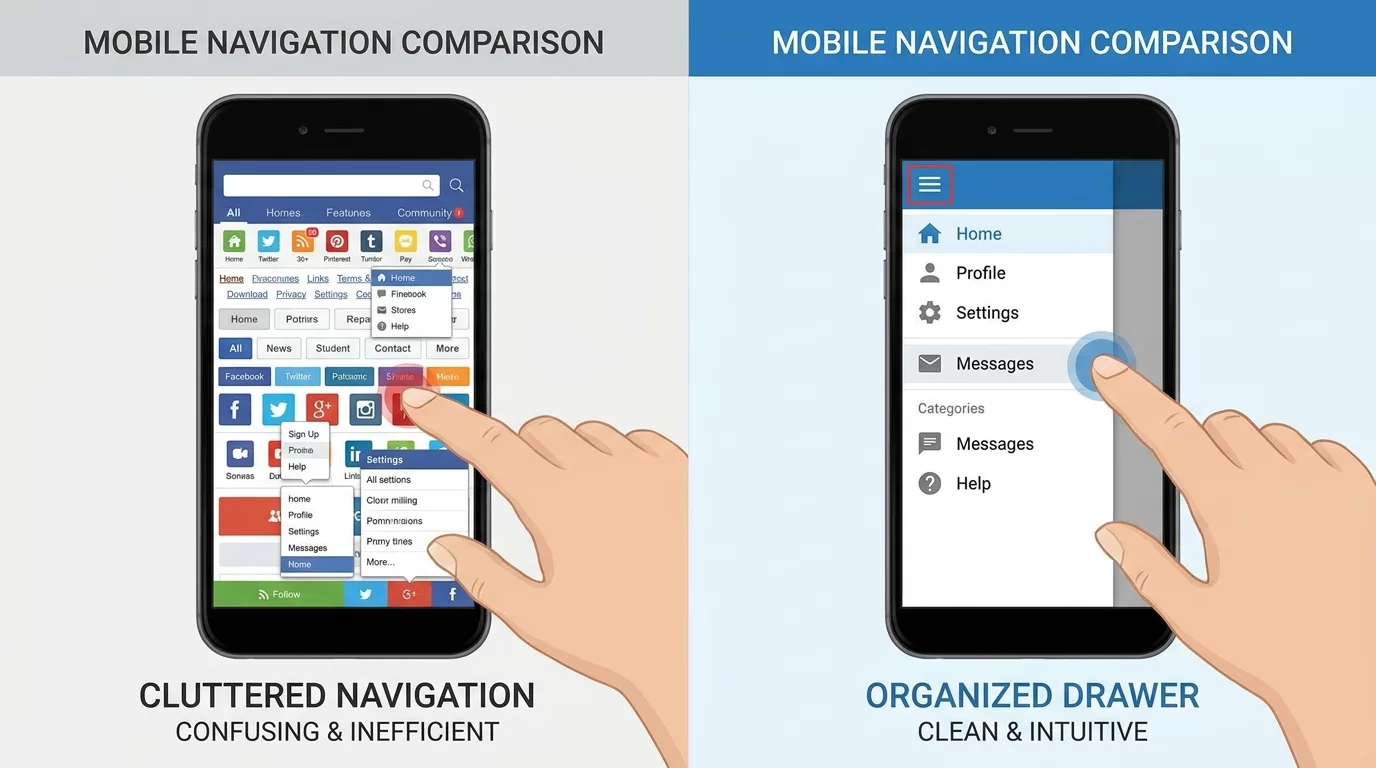
The Shift Toward Mobile Experiences
Today, most users browse websites on smartphones. Small screens require navigation systems that are compact, intuitive, and easy to access.
Traditional desktop menus often fail on mobile because they:
- Take up too much space
- Become difficult to tap
- Overwhelm users
A navigation drawer solves these problems.
What Is an App-Like Navigation Drawer?

A navigation drawer is a hidden panel that slides into view when users tap a menu button.
Common features include:
- Slide-in animation
- Full-height panel
- Touch-friendly links
- User profile sections
- Organized menu categories
This design helps maximize screen space while maintaining accessibility.
Understanding the Mobile-First Approach
Designing for Small Screens First
Mobile-first means starting with the smallest screen and gradually enhancing the experience for larger devices.
Benefits include:
- Cleaner layouts
- Better performance
- Improved usability
- Easier responsiveness
Planning Drawer Content
Before coding, decide what belongs inside the drawer.
Examples:
- Home
- Profile
- Settings
- Orders
- Notifications
- Contact
Avoid cluttering the menu.
Focus only on essential actions.
Building the Basic HTML Structure
Drawer Layout
Start with semantic HTML.
<input type="checkbox" id="menu-toggle">

<label for="menu-toggle" class="menu-button">
☰
</label>

<nav class="drawer">
    <ul>
        <li><a href="#">Home</a></li>
        <li><a href="#">Profile</a></li>
        <li><a href="#">Settings</a></li>
        <li><a href="#">Support</a></li>
    </ul>
</nav>
Why Use a Checkbox?
The hidden checkbox acts as a state controller.
Advantages:
- No JavaScript required
- Lightweight solution
- Broad browser support
This technique forms the foundation of pure CSS interactions.
Styling the Navigation Drawer
Hiding the Checkbox
#menu-toggle {
    display: none;
}
Creating the Menu Button
.menu-button {
    font-size: 30px;
    cursor: pointer;
    padding: 15px;
}
Drawer Styling
.drawer {
    position: fixed;
    top: 0;
    left: -280px;
    width: 280px;
    height: 100%;
    background: #ffffff;
    transition: left 0.3s ease;
}
The drawer remains hidden until activated.
Adding Slide-In Animation
Opening the Drawer
#menu-toggle:checked ~ .drawer {
    left: 0;
}
This moves the drawer into view.
Smooth Transitions
Animations should feel natural.
Recommended duration:
transition: left 0.3s ease;Benefits include:
- Better visual feedback
- Enhanced user experience
- More polished interfaces
Avoid extremely slow animations.
Fast interactions feel more responsive.
Improving User Experience
Organizing Navigation Links
Group related items together.
Example categories:
Account
- Profile
- Security
- Notifications
Shopping
- Orders
- Wishlist
- Cart
Support
- Help Center
- Contact
Grouping reduces cognitive load.
Larger Touch Targets
Mobile users interact with fingers.
Use:
.drawer a {
    display: block;
    padding: 16px;
}
This improves accessibility and comfort.
Visual Feedback
Add hover and active states.
Example:
.drawer a:hover {
    background: #f2f2f2;
}
Users immediately understand their actions.
Making the Drawer Fully Responsive
Tablet Optimization
Larger screens can display wider drawers.
Example:
@media (min-width: 768px) {
    .drawer {
        width: 320px;
    }
}
Desktop Adaptation
On desktops:
- Convert drawer into sidebar
- Keep navigation visible
- Reduce unnecessary animations
Responsive enhancements improve consistency across devices.
Testing Different Devices
Always test on:
- Small phones
- Large phones
- Tablets
- Laptops
- Wide monitors
Real-world testing reveals usability issues quickly.
Pro Tips for Professional Navigation Drawers
Building a great drawer involves more than making it slide.
Follow these recommendations:
- Keep menus short and focused.
- Prioritize important actions.
- Use recognizable icons.
- Maintain consistent spacing.
- Avoid deep navigation hierarchies.
- Ensure adequate contrast.
- Test with real users.
- Minimize distractions.
Another valuable tip is placing frequently used items near the top. Users naturally interact with visible options first.
Also, maintain consistency throughout the application. If one drawer uses certain visual styles and behaviors, avoid changing them unexpectedly elsewhere.
Small improvements often create the biggest usability gains.
Common Mistakes to Avoid
Even experienced developers make navigation mistakes.
Overloading the Drawer
Too many menu items overwhelm users.
Keep navigation focused.
Ignoring Accessibility
Poor accessibility excludes users.
Consider:
- Keyboard navigation
- Focus visibility
- Screen reader compatibility
Tiny Tap Areas
Small buttons frustrate mobile users.
Provide generous spacing.
Excessive Animation
Long animations slow interactions.
Users value speed.
Forgetting Landscape Orientation
Phones rotate frequently.
Test both portrait and landscape views.
Avoiding these common issues results in navigation systems that feel intuitive and reliable.
Advanced Strategies for App-Like Experiences
As your frontend skills grow, navigation systems can evolve beyond basic drawers.
Overlay Backgrounds
Add dimmed overlays to focus attention.
Example:
- Improves visual hierarchy
- Emphasizes active navigation
Profile Headers
Include:
- User avatar
- Name
- Membership details
This creates familiarity.
Nested Sections
Expandable categories help organize large menus.
Examples:
- Products
- Services
- Administration
Use them carefully to avoid complexity.
Design Systems
Create reusable drawer components with:
- Shared spacing rules
- Typography standards
- Consistent animations
Design systems improve maintainability.
Performance Considerations
Pure CSS navigation offers advantages:
- Reduced JavaScript overhead
- Faster loading
- Better stability
- Simpler debugging
These benefits become increasingly valuable as applications scale.
The goal is not merely building a drawer. The goal is creating navigation that users barely notice because it feels natural and effortless.
Frequently Asked Questions
Can I build an app-like navigation drawer without JavaScript?
Yes. Using techniques such as hidden checkboxes and CSS selectors, you can create fully functional navigation drawers using pure CSS. While JavaScript can provide additional functionality, many common drawer interactions work perfectly without it. This approach also improves performance and reduces code complexity.
Is a mobile-first navigation drawer good for desktop websites?
Yes. Starting with mobile-first principles often leads to cleaner designs. You can enhance the drawer experience for larger screens by transforming it into a sidebar or persistent navigation panel. This allows one system to adapt smoothly across devices.
How wide should a navigation drawer be?
Most mobile drawers range between 250 and 320 pixels wide. The ideal width depends on your content and audience. The drawer should provide enough room for comfortable interaction without covering too much of the main interface.
Are pure CSS drawers accessible?
They can be, but accessibility requires careful planning. Developers should support keyboard interactions, maintain visible focus states, use semantic HTML elements, and ensure adequate color contrast. Accessibility should always be considered during the design process rather than added later.
Should I include icons inside the drawer?
Icons can improve usability by helping users recognize actions quickly. However, icons should complement text labels rather than replace them completely. Combining icons with descriptive labels creates the clearest experience.
How do I improve drawer performance?
Keep styles lightweight, avoid unnecessary effects, optimize assets, and minimize layout complexity. Pure CSS approaches already provide strong performance advantages because they eliminate many JavaScript dependencies.
Conclusion
Building an app like navigation drawer CSS experience does not require heavy frameworks or complex JavaScript solutions. By embracing mobile-first thinking and leveraging pure CSS techniques, you can create navigation systems that feel smooth, responsive, and intuitive.
Throughout this guide, we explored the foundations of drawer navigation, responsive design strategies, usability improvements, accessibility considerations, and advanced enhancements that elevate the overall user experience.
Remember that effective navigation is not about flashy effects. It is about helping users reach their goals quickly and comfortably.
Start with a simple structure, test across devices, refine based on feedback, and continue improving over time. Small details such as spacing, animation timing, and touch targets often make the biggest difference.
With these principles in place, you can confidently build navigation experiences that feel modern, professional, and remarkably close to native mobile applications.
Also Read
The Right Way to Pass Dynamic Data Through a Custom Payment Gateway Webhook in PHP
Related Articles


Leave a Comment
Your email address will not be published. Required fields are marked *