Fixing Axios "Network Error" When Connecting a React Frontend to a Node.js API
Introduction
Few things are more frustrating for developers than seeing a request fail with an "Network Error" message when everything appears to be configured correctly. You click a button in your React application, Axios sends a request, and instead of receiving data from your backend, you're greeted with an error that provides little information about what actually went wrong.
If you've encountered the Axios Network Error React problem while connecting a React frontend to a Node.js API, you're not alone. This is one of the most common issues developers face during frontend and backend integration. The challenge is that the error can be caused by many different problems, including incorrect API URLs, CORS restrictions, server crashes, HTTPS issues, firewall settings, or misconfigured environments.
The good news is that most Axios network errors can be identified and fixed quickly once you understand how requests travel between the frontend and backend. In this guide, you'll learn exactly what causes the error, how to diagnose it systematically, and the best solutions for different scenarios.
Whether you're building a React dashboard, e-commerce platform, school management system, SaaS application, or REST API integration, this guide will help you troubleshoot connection issues with confidence and build more reliable applications.
Understanding What Axios Network Error Actually Means
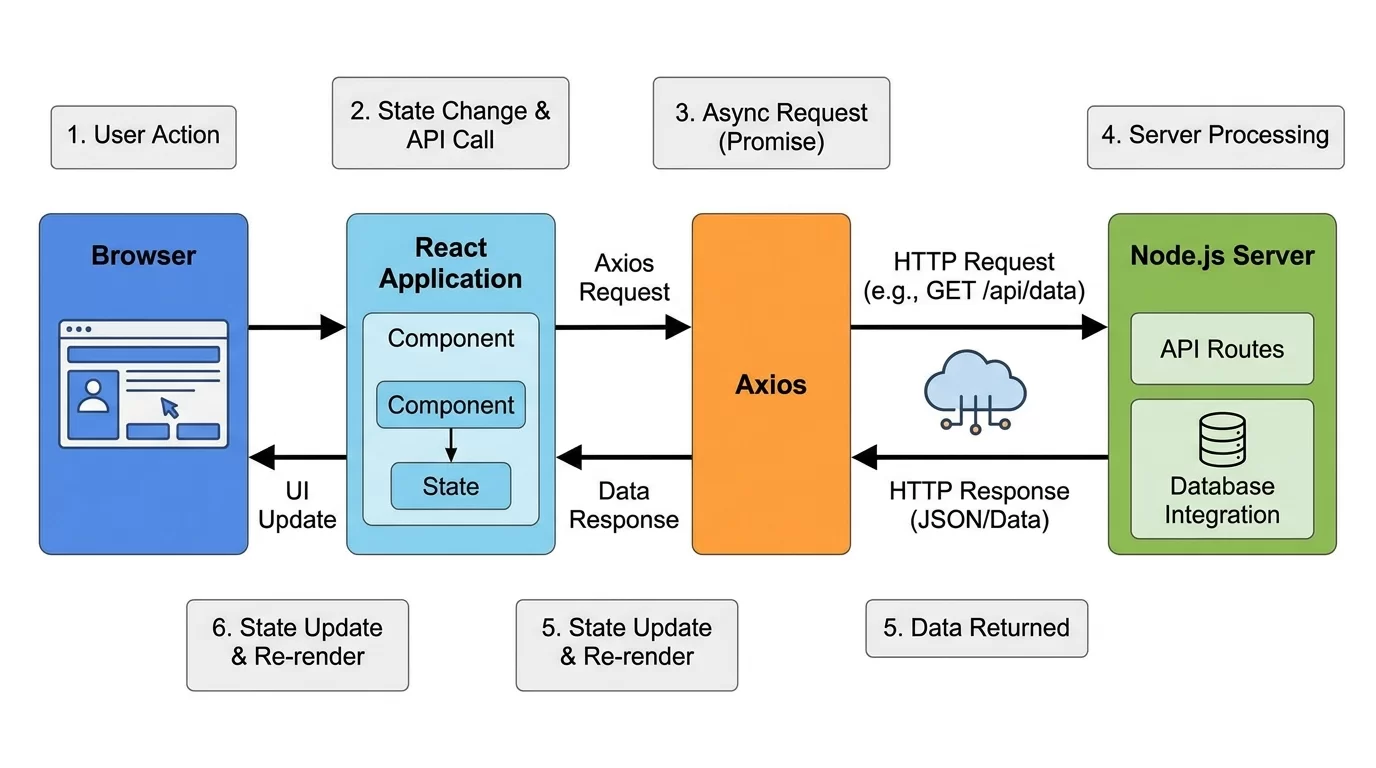
What Is an Axios Network Error?
Axios displays a network error when it cannot successfully complete communication with the server.
Unlike HTTP errors such as:
- 404 Not Found
- 401 Unauthorized
- 500 Internal Server Error
A network error occurs before Axios receives a valid response.
This means:
- Request never reaches the server
- Server never responds
- Browser blocks the request
- Connection fails during transmission
Why the Error Is Often Confusing
A typical Axios error might look like:
axios.get("http://localhost:5000/api/users")
.catch(error => {
    console.log(error);
});
Browser console:
AxiosError: Network ErrorThe message doesn't clearly identify the cause.
That's why developers must investigate multiple layers:
- React frontend
- Browser
- Network
- Node.js server
- API configuration
Common Causes of Axios Network Errors

Incorrect API URL
One of the most common mistakes is using the wrong endpoint.
Example:
axios.get("http://localhost:500/api/users")Actual backend:
http://localhost:5000/api/usersEven a small typo causes failure.
Backend Server Not Running
Verify that your Node.js application is active.
Example:
npm startor
node server.jsIf the backend is offline, React cannot establish a connection.
Wrong HTTP Protocol
Example:
http://localhost:5000while backend requires:
https://localhost:5000Protocol mismatches frequently cause connection failures.
Checking the Node.js Backend First
Verify Server Startup
Ensure Express is listening properly.
Example:
app.listen(5000, () => {
    console.log("Server running");
});
Check terminal output.
You should see:
Server runningTest API Directly
Open browser:
http://localhost:5000/api/testOr use Postman.
If the endpoint fails independently of React, the problem is likely in the backend.
Inspect Server Logs
Server logs often reveal:
- Route errors
- Database failures
- Application crashes
- Missing middleware
Always examine backend logs before debugging frontend code.
Fixing CORS Issues
What Is CORS?
Cross-Origin Resource Sharing (CORS) is a browser security mechanism.
Example:
Frontend:
http://localhost:3000Backend:
http://localhost:5000These are different origins.
Without proper configuration, browsers block requests.
Installing CORS Middleware
Install:
npm install corsConfigure Express
const cors = require('cors');

app.use(cors());
This allows frontend communication.
Restrict Specific Origins
Production environments should be more secure:
app.use(cors({
  origin: "https://yourdomain.com"
}));
This prevents unauthorized access.
Browser Developer Tools Investigation
Open Network Tab
Press:
F12Then:
Network → XHRWatch requests in real time.
Check Request Details
Inspect:
- URL
- Status
- Headers
- Response
Important clues often appear here.
Review Console Errors
Examples:
CORS policy blocked requestor
ERR_CONNECTION_REFUSEDThese messages provide direct troubleshooting hints.
Compare Working and Failed Requests
If one endpoint works while another fails:
- Compare headers
- Compare URLs
- Compare request methods
This often reveals configuration mistakes.
Environment Variables and API Configuration
Using Environment Files
React projects commonly store API URLs in environment variables.
Example:
REACT_APP_API_URL=http://localhost:5000Usage:
axios.get(
 process.env.REACT_APP_API_URL +
 "/api/users"
);
Common Environment Mistakes
Developers often forget:
- Restart React after changes
- Include REACT_APP prefix
- Update production values
Incorrect variables frequently cause network errors.
Managing Multiple Environments
Use separate configurations:
Development:
REACT_APP_API_URL=http://localhost:5000Production:
REACT_APP_API_URL=https://api.example.comThis simplifies deployments.
HTTPS, SSL, and Security Problems
Mixed Content Errors
Modern browsers block:
Frontend:
https://example.comCalling:
http://api.example.comThis creates mixed-content issues.
Solution
Use HTTPS everywhere.
Example:
https://api.example.comSSL Certificate Problems
Invalid certificates may trigger connection failures.
Verify:
- Certificate validity
- Expiration date
- Domain matching
These issues often appear in production environments.
Advanced Request Debugging Techniques
Create Axios Interceptors
Interceptors help inspect requests.
Example:
axios.interceptors.request.use(config => {
    console.log(config);
    return config;
});
Log Response Failures
axios.interceptors.response.use(
 response => response,
 error => {
   console.log(error);
   return Promise.reject(error);
 }
);
This provides deeper visibility.
Timeout Detection
Example:
axios.get(url, {
 timeout: 5000
});
Timeouts help identify slow servers.
Test Using CURL
Example:
curl http://localhost:5000/api/usersThis removes React from the equation.
Pro Tips for Preventing Axios Network Errors
Experienced developers use proactive strategies.
Recommended practices:
- Centralize API configuration.
- Use environment variables.
- Monitor backend logs continuously.
- Validate endpoints before deployment.
- Enable CORS correctly.
- Use HTTPS in production.
- Implement request logging.
- Create health-check endpoints.
Another valuable technique is creating a dedicated API service file.
Example:
const api = axios.create({
 baseURL: process.env.REACT_APP_API_URL
});
This prevents URL inconsistencies throughout the project.
Automated monitoring tools can also detect connectivity issues before users report them.
Common Mistakes to Avoid
Hardcoding URLs
Avoid:
http://localhost:5000/apiUse environment variables instead.
Ignoring Browser Console
Many developers immediately inspect code while ignoring browser diagnostics.
The browser often reveals the exact problem.
Disabling Security Features
Some developers disable CORS or browser protections temporarily.
This creates larger problems later.
Not Testing APIs Independently
Always verify backend functionality using:
- Postman
- CURL
- Browser requests
Forgetting Production Configurations
Applications often work locally but fail after deployment because environment settings were never updated.
Careful deployment planning prevents these issues.
Advanced Strategy: Building a Reliable React-to-Node API Architecture
As applications grow, connection reliability becomes increasingly important.
Create API Health Endpoints
Example:
app.get('/health', (req,res)=>{
   res.send('OK');
});
React can verify connectivity before making requests.
Use Request Monitoring
Track:
- Failed requests
- Response times
- Server availability
Monitoring improves system reliability.
Implement Retry Logic
Temporary network failures happen.
Example:
- Internet interruptions
- Server restarts
- Cloud provider issues
Retries improve user experience.
Use Reverse Proxies
Production systems often place:
- Nginx
- Apache
- Load balancers
Between React and Node.js.
Benefits include:
- Better security
- SSL management
- Improved performance
Build Error Handling Standards
Create consistent handling for:
- Network failures
- Authentication issues
- Server errors
- Timeouts
Well-designed error systems make troubleshooting significantly easier as projects scale.
Frequently Asked Questions
Why does Axios show Network Error even when my API is running?
A running API does not guarantee successful communication. The issue may involve CORS restrictions, incorrect URLs, SSL certificate problems, firewall rules, proxy settings, or browser security policies. Verify that the frontend can actually reach the backend endpoint and inspect browser developer tools for additional details.
How do I know if CORS is causing the problem?
Open the browser console and look for messages mentioning Cross-Origin Resource Sharing or blocked requests. If CORS is the issue, the browser typically displays a detailed warning. Installing and properly configuring the CORS middleware in your Node.js application usually resolves the problem.
Can HTTPS cause Axios Network Error?
Yes. Mixed-content restrictions occur when an HTTPS website tries to access an HTTP API. Browsers block these requests for security reasons. Ensure both frontend and backend use HTTPS and verify that SSL certificates are valid and properly configured.
Why does Axios work in Postman but fail in React?
Postman does not enforce browser security rules like CORS. A request that succeeds in Postman may still fail inside a browser because of cross-origin restrictions, mixed-content policies, or frontend-specific configuration errors. Compare both environments carefully.
Should I use localhost URLs in production?
No. Production systems should use proper domain names or API endpoints. Localhost only works on your development machine. Always use environment variables to separate development and production configurations and avoid deployment issues.
What tools help diagnose Axios Network Error React issues?
Useful tools include browser developer tools, Network tab analysis, Postman, CURL, Axios interceptors, server logs, monitoring platforms, and health-check endpoints. Using multiple diagnostic methods helps identify the root cause much faster than relying on trial and error.
Conclusion
The Axios Network Error React issue can seem difficult at first because the error message rarely points directly to the real cause. However, once you understand how React, Axios, browsers, networks, and Node.js APIs work together, troubleshooting becomes much easier.
In most cases, the problem comes down to a small number of common issues: incorrect API URLs, CORS restrictions, backend availability problems, HTTPS mismatches, environment configuration mistakes, or browser security policies. By following a structured debugging process, you can quickly identify and resolve these problems.
Remember to always start by verifying the backend independently, inspect browser developer tools carefully, review server logs, and validate environment settings. These simple steps often reveal the root cause within minutes.
As your applications grow, invest in better monitoring, logging, health checks, and standardized API architecture. These practices not only fix current issues but also prevent future connectivity problems.
The next time you encounter a network error, you'll have a clear roadmap to diagnose the problem and get your React frontend communicating with your Node.js API smoothly again.
Also read How to Build a Mobile-First, App-Like Navigation Drawer Using Pure CSS
Related Articles


Leave a Comment
Your email address will not be published. Required fields are marked *