The Right Way to Pass Dynamic Data Through a Custom Payment Gateway Webhook in PHP
Introduction
Imagine a customer successfully completes a payment on your website, but the order never updates because your system cannot identify which purchase the payment belongs to. This is one of the most frustrating situations in e-commerce development. The good news is that it can be avoided by understanding the correct way to work with a payment gateway webhook PHP implementation.
Webhooks play a critical role in modern payment systems. They allow payment providers to notify your application when important events occur, such as successful payments, refunds, subscription renewals, or failed transactions. However, simply receiving webhook notifications is not enough. You must also know how to safely pass and retrieve dynamic data so your application knows exactly what action to perform.
In this guide, you will learn how to pass dynamic data through custom payment webhooks in PHP securely and efficiently. We will cover webhook fundamentals, methods for sending custom identifiers, database strategies, security validation, real-world examples, and best practices used by experienced developers.
Whether you are building a custom checkout system, integrating a local payment gateway, or creating your own e-commerce platform, this guide will help you build a reliable webhook system that works correctly even as your business grows.
Understanding Payment Webhooks
What Is a Payment Webhook?
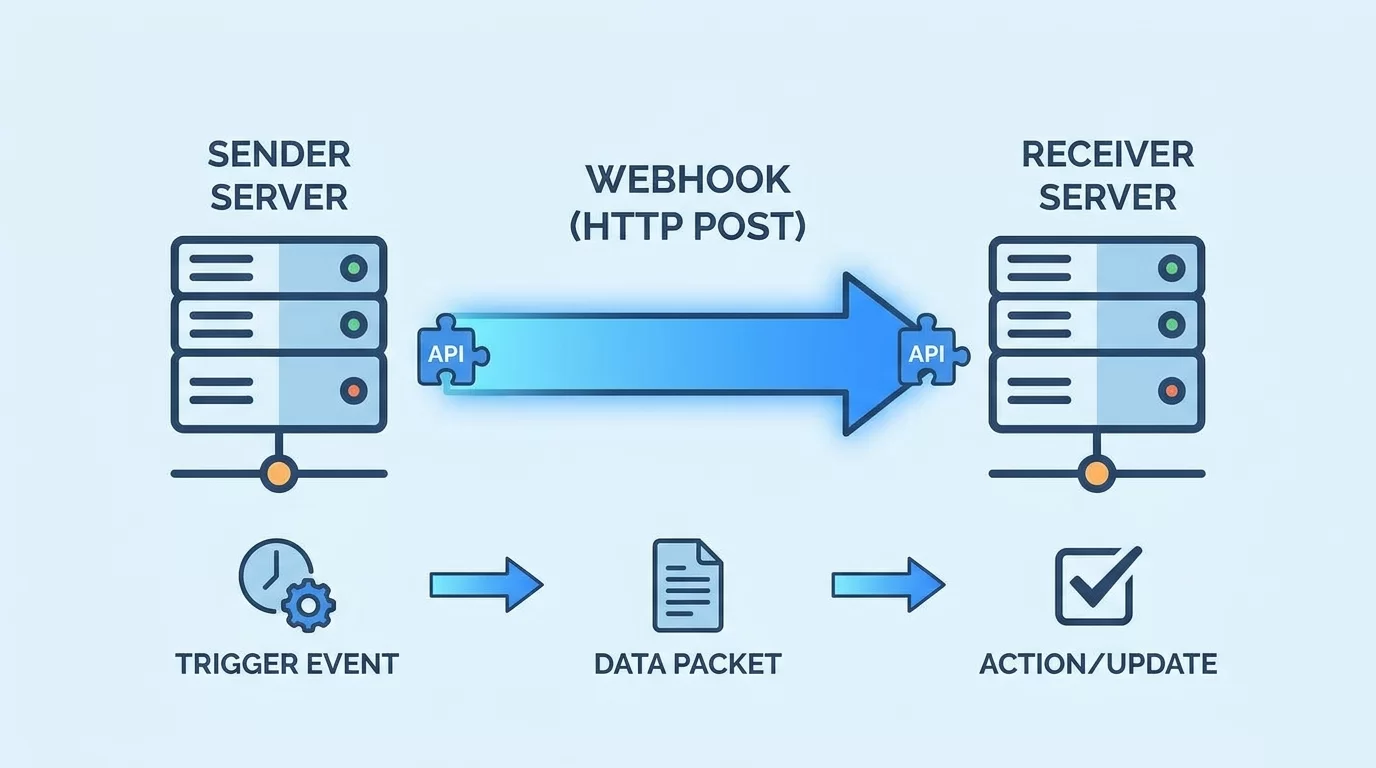
A webhook is an automated HTTP callback sent by a payment gateway to your server whenever a specific event occurs.
Examples include:
- Successful payments
- Failed transactions
- Subscription renewals
- Chargebacks
- Refund notifications
Instead of constantly asking the payment provider whether a payment status changed, the provider pushes the information to your application automatically.
Why Dynamic Data Matters
Without dynamic data, your webhook only knows that a payment happened.
It does not know:
- Which customer paid
- Which order belongs to the payment
- Which subscription should be updated
- Which invoice should be marked as paid
Dynamic values connect payment events to your application's records.
How Dynamic Data Flows Through Payment Systems
Typical Payment Process
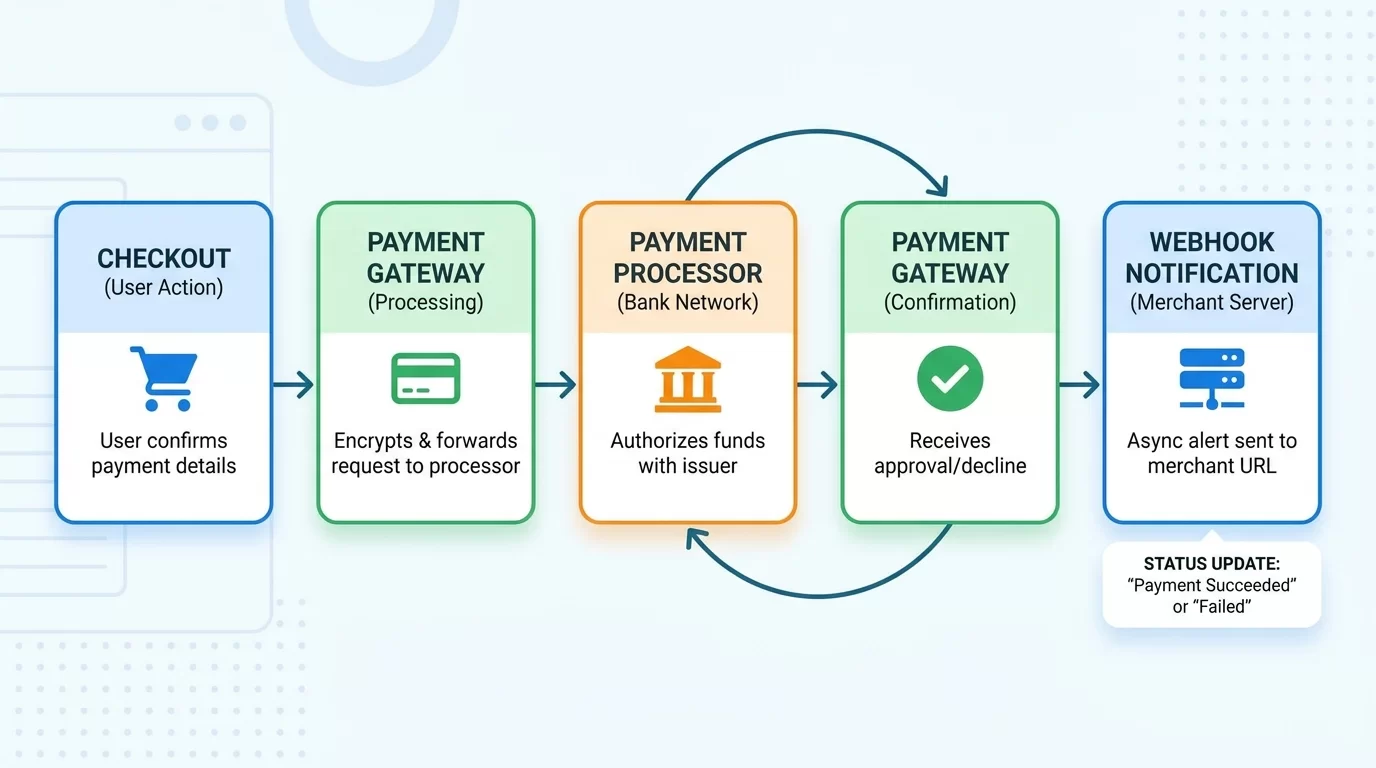
A standard workflow looks like this:
- Customer places an order.
- Your application creates an order record.
- Payment request is sent to the gateway.
- Dynamic identifiers are attached.
- Customer completes payment.
- Gateway triggers webhook.
- Webhook validates the request.
- Your application updates the correct order.
This entire process often takes only a few seconds.
Examples of Dynamic Data
Useful dynamic values include:
- Order IDs
- Customer IDs
- Invoice numbers
- Subscription IDs
- Product references
- Branch identifiers
The key is choosing values that uniquely identify the transaction.
Passing Dynamic Data to the Payment Gateway
Using Metadata Fields
Many gateways support metadata.
Example:
$payload = [
    "amount" => 150,
    "currency" => "USD",
    "metadata" => [
        "order_id" => 1258,
        "customer_id" => 441
    ]
];
Metadata travels with the transaction.
When the webhook fires later, those values return with the event.
Using Reference Numbers
Some gateways only support reference fields.
Example:
$payload = [
    "amount" => 150,
    "reference" => "ORD-1258"
];
This reference becomes your link between the gateway and your database.
Storing Data Before Redirect
Always save the transaction locally before redirecting customers to payment pages.
Example database fields:
- order_id
- transaction_reference
- customer_id
- payment_status
This protects against lost sessions.
Building the Webhook Endpoint in PHP
Receiving the Webhook Request
Create a webhook file:
<?php

$payload = file_get_contents("php://input");

$data = json_decode($payload, true);
This reads the incoming request body.
Extract Dynamic Values
Example:
$orderId = $data['metadata']['order_id'];

$customerId = $data['metadata']['customer_id'];
If using references:
$reference = $data['reference'];Update Database Records
Example:
$stmt = $pdo->prepare("
UPDATE orders
SET payment_status='paid'
WHERE id=?
");

$stmt->execute([$orderId]);
The correct order is updated automatically.
Securing Your Payment Gateway Webhook PHP Integration
Verify Signatures
Never trust incoming requests automatically.
Example:
$signature = $_SERVER['HTTP_X_SIGNATURE'];Compare it against your secret key.
If validation fails:
http_response_code(401);

exit;
Use HTTPS
Always protect webhook endpoints using SSL certificates.
Benefits:
- Prevents interception
- Protects payment information
- Improves trust
Restrict IP Addresses
If supported:
- Allow only gateway IP ranges
- Block unknown sources
This reduces malicious requests.
Log Every Request
Example database log fields:
- request payload
- timestamp
- IP address
- validation result
Logs simplify troubleshooting.
Handling Real-World Scenarios
Duplicate Webhooks
Payment gateways sometimes retry failed notifications.
Before updating records:
Check:
if ($order['payment_status'] === 'paid') {
    exit;
}
This prevents duplicate processing.
Delayed Notifications
Webhooks may arrive minutes later.
Avoid depending on customer browser sessions.
Always use database records.
Failed Updates
If database updates fail:
- Log the error
- Retry processing
- Alert administrators
Reliability matters more than speed.
Pro Tips for Reliable Webhook Development
Building dependable webhook systems requires attention to detail.
Follow these practical recommendations:
- Save transactions before redirecting users.
- Use unique references for every payment.
- Validate signatures on every request.
- Make webhook actions idempotent.
- Log incoming payloads.
- Respond quickly with HTTP 200 status.
- Process heavy tasks in background queues.
- Test using sandbox environments.
One of the most important habits is treating webhooks as untrusted external requests. Even if the request appears legitimate, always validate and verify before updating critical records.
Reliable systems are built through consistency rather than shortcuts.
Common Mistakes to Avoid
Many webhook failures happen because of simple mistakes.
Trusting Unverified Requests
Skipping signature validation exposes your system to fraud.
Depending on Sessions
Webhook requests do not have customer sessions.
Always use stored database records.
Ignoring Duplicate Events
Duplicate notifications happen frequently.
Make processing idempotent.
Not Logging Failures
Without logs, diagnosing issues becomes extremely difficult.
Using Predictable References
Avoid simple references like:
ORDER1
ORDER2
ORDER3
Use unique identifiers instead.
Preventing these mistakes dramatically improves reliability.
Advanced Strategy: Designing Webhooks for Long-Term Growth
As businesses expand, webhook systems become more complex.
Modern architectures often separate webhook reception from processing.
Queue-Based Processing
Workflow:
- Receive webhook.
- Validate signature.
- Save payload.
- Push job to queue.
- Background workers process updates.
Benefits include:
- Faster responses
- Improved scalability
- Better reliability
Event Storage
Maintain an events table:
- event_id
- gateway_name
- payload
- processed_status
- processed_at
This provides audit trails.
Retry Systems
Temporary failures happen.
Retry mechanisms allow:
- Automatic recovery
- Reduced manual intervention
- Improved consistency
Monitoring
Track:
- Failed webhooks
- Processing times
- Retry attempts
- Gateway outages
Monitoring helps identify issues before customers notice them.
A webhook system designed for growth can handle thousands of transactions without sacrificing accuracy.
Frequently Asked Questions
What dynamic data should I pass through payment webhooks?
You should pass values that uniquely identify records within your application. Common examples include order IDs, invoice numbers, customer IDs, subscription references, and branch identifiers. These values help your system determine exactly which records should be updated after receiving payment notifications.
Is metadata more secure than reference numbers?
Metadata and references are both useful, but neither should be trusted automatically. Security comes from validating webhook signatures and verifying transactions against your database. Metadata provides flexibility, while references are often simpler and supported by more gateways.
Why should webhook processing be idempotent?
Payment gateways may resend notifications if they do not receive successful responses. Idempotent processing ensures that repeated requests do not create duplicate orders, multiple invoices, or repeated subscription activations. This protects data accuracy and financial records.
Can I use PHP sessions inside webhook endpoints?
No. Webhooks are server-to-server requests and are not connected to customer browser sessions. Instead, use stored references and database records to identify the appropriate transaction and customer information.
What should I do if a webhook fails?
Record the failure in logs, save the payload for investigation, and implement retry mechanisms where possible. Monitoring systems should notify administrators of repeated failures so problems can be resolved quickly before they affect customers.
How do I test payment webhooks safely?
Most gateways provide sandbox environments for testing. Use these environments to simulate payments, refunds, and failures. Verify signatures, test duplicate notifications, and confirm database updates before deploying changes to production systems.
Conclusion
A well-designed payment gateway webhook PHP integration does far more than receive payment notifications. It acts as the bridge between your payment provider and your application's business logic.
By passing dynamic data correctly, validating incoming requests, storing reliable references, and designing idempotent processing flows, you can eliminate many of the problems that commonly affect payment systems.
The principles covered in this guide are used in real-world e-commerce applications handling thousands of transactions every day. They help prevent duplicate orders, reduce support issues, and improve customer confidence.
Take time to implement these practices carefully. A few extra steps during development can save countless hours of troubleshooting later and ensure your payment infrastructure remains secure, scalable, and dependable.
Also Read
Step-by-Step Guide to Connecting WhatsApp Cloud API with Custom PHP Scripts
Related Articles
Leave a Comment
Your email address will not be published. Required fields are marked *